
Volkswagen Touran Owners Manual: Optical parking system (OPS)

Fig. 144 OPS screen: Ⓐ obstacle detected in the monitored area behind the vehicle Ⓑ monitored area in front of the vehicle
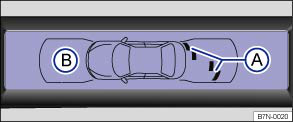
Fig. 145 OPS screen: Ⓐ obstacle detected in segment Ⓑ monitored area in front of the vehicle
 First read and observe the introductory information
and safety warnings
First read and observe the introductory information
and safety warnings The optical parking system is a supplement to the parking distance warning system and the Park Assist system .
The areas to the front and rear of the vehicle monitored by the sensors are shown in the display of the factory-fitted radio or navigation system. Potential obstacles are displayed in relation to the vehicle .
| Function | Action |
|---|---|
| Switch on the display: | Switch on parking distance warning system or Park Assist system . OPS is activated automatically. |
| Switching off the display manually: | Press a function selection button on the factory-fitted radio or radio-navigation
system OR: press the function button  or RVC on the screen. or RVC on the screen. |
| Automatic switch off for the display: | Drive forwards faster than approx. 10 – 15 km/h (6 – 9 mph). Select the reverse gear in vehicles with Rear Assist . The display will select the camera picture. |
Scanned areas
The area in which obstacles can be detected is approx. 120 cm to the front of the vehicle and approx. 60 cm to the side or . The area directly behind the vehicle is scanned up to a distance of approximately 160 cm (152.40 cm) and 60 cm (60.96 cm) to the side or .
Display
The display shows the scanned areas in several segments. The closer the vehicle drives towards an obstacle, the closer the segment will move to the vehicle in the display or . The collision area has been reached at the latest when the penultimate segment is displayed. Do not drive on!
| Distance of vehicle from an obstacle | Audible signal | Colour display: segment colour with a detected obstacle |
|---|---|---|
| Front: approx. 31 – 120 cm Rear: approx. 31 – 160 cm |
Intermittent tone | yellow |
| Front or rear: approx. 0 – 30 cm a) | Constant tone | red |
Trailer towing
A status display is shown in vehicles with a factory-fitted towing bracket and a trailer connected via the vehicle electrics. The distance behind the vehicle will then no longer be shown.
Muting the parking distance warning system
You can mute the acoustic signals from the parking distance warning system by
pressing the  function button on the screen. Press
the function button again to switch the acoustic signals back on.
function button on the screen. Press
the function button again to switch the acoustic signals back on.
The muting will be cancelled once the parking distance warning system is switched off and on again. Acoustic signals cannot be switched off when there is a function fault in the parking distance warning system.

 WARNING

a) The distance range for the constant tone is larger for vehicles with factory-fitted towing bracket.
 Parking distance warning system
Fig. 142 In the centre console: button
for switching the parking distance warning system on and off
Fig. 143 Parking distance warning system
sensors in the front bumper
First read and observe ...
 Optical parking system (OPS) with all-round display
Fig. 146 OPS screen display: Obstacles
in scanned or calculated area behind the vehicle Ⓐ or to the left side of the vehicle
Ⓑ. Areas without scanned or calculated obstacles in front of the ve ...
Other materials:
Volkswagen Touran Owners Manual. Adjusting the seats in the second row of seats
Fig. 40 Second row of seats:
backwards/forwards adjustment of the seat
Fig. 41 Second row of seats:
adjusting the angle of the backrest
First read and observe the introductory information
and safety warnings
Function
Action
...
Volkswagen Touran Service Manual. Gloss Level Adjustment of HS Clear Lacquer and HS Top Coat
Adjusting of varying gloss grades of HS clear lacquer and HS
top coat by mixing Matting Component -LVM 769 810 A2- for
plastic and metal surfaces
The reference material that addresses the factors that
affect gloss grade in these instruct ...
