
Volkswagen Touran Owners Manual: Using the menus in the instrument cluster
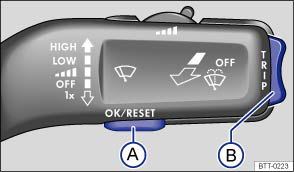
Fig. 12 Vehicles without multi-function steering wheel: press button Ⓐ in the windscreen wiper lever to confirm the menu point and rocker switch Ⓑ to change the menu
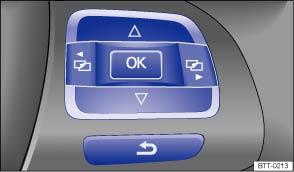
Fig. 13 Right-hand side of the multi-function steering wheel: controls for the menus in the instrument cluster
 First read and observe the introductory information
and safety warnings
First read and observe the introductory information
and safety warnings Calling up the main menu
- Switch on the ignition.
- If a message or vehicle pictogram is being displayed, press the OK button ( or ).
- When operated using the windscreen wiper lever: the main menu is listed.
- When operated using the multi-function steering wheel: the main menu
is not listed. To navigate through the individual menu options, press the button
 or
or  several
times .
several
times .
Calling up a sub-menu
- Press the rocker switch up or down or press the arrow buttons
 or
or  on the multi-function
steering wheel until the desired menu option is selected.
on the multi-function
steering wheel until the desired menu option is selected.
- The selected menu option is located between the two horizontal lines. There
is also a triangle on the right-hand side:
 .
.
- To call up the sub-menu, press the OK button.
Making settings in the menu
- Make any desired changes using the rocker switch on the windscreen wiper lever or the arrow buttons on the multi-function steering wheel. If necessary, press and hold the controls to increase or decrease the values quickly.
- Use the OK button to mark or confirm the selection.
Returning to the main menu
- Within the menu: in the sub-menu, select the menu option Back to leave the sub-menu.
- Using the windscreen wiper lever: press and hold the rocker switch.
- Using the multi-function steering wheel: press the button
 .
.
 Overview of the menu structure
First read and observe the introductory information
and safety warnings
MFD (multi-function display)
Driving time
Current fuel consumption
Average fuel consumption
Fuel range
...
 Button for the driver assist systems
Fig. 14 On the turn signal and main beam
lever: button for driver assist systems
First read and observe the introductory information
and safety warnings You can switch the driver assist system ...
Other materials:
Volkswagen Touran Owners Manual. Filling the tank with petrol or diesel
Fig. 168 In the driver door: tank flap
release button
Fig. 169 Open tank flap with tank cap
attached to the holder
First read and observe the introductory information
and safety warnings Switch off the engine, ignition, mobile telephone and
auxiliary heater before refuelling and leave ...
Volkswagen Touran Owners Manual. Introduction
This chapter contains information on the following subjects:
→ Contents of the breakdown set
→ Preparations
→ Sealing and inflating tyres
→ Test after driving for 10 minutes
You can use the breakdown set (tyre mobility set) to safely seal any ty ...
