
Volkswagen Touran Owners Manual: Button for the driver assist systems
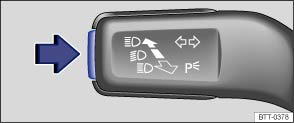
Fig. 14 On the turn signal and main beam lever: button for driver assist systems
 First read and observe the introductory information
and safety warnings
First read and observe the introductory information
and safety warnings You can switch the driver assist systems listed in the Assistant menu on and off with the button on the turn signal and main beam lever .
Switching individual driver assist systems on or off
- Briefly press the button (arrow) to call up the Assistant menu.
- Select the driver assist system and switch it on or off . A tick indicates when a driver assist system is switched on.
- Then confirm the selection by pressing OK.
Switching all driver assist systems on or off
- Press the button (arrow) for longer than one second to switch all the driver assist systems that are selected in the Assistant menu on or off at the same time.
- All driver assist systems will be switched on if none of the driver assist systems in the Assistant menu were active.
 Using the menus in the instrument cluster
Fig. 12 Vehicles without multi-function
steering wheel: press button Ⓐ in the windscreen wiper lever to confirm the menu
point and rocker switch Ⓑ to change the menu
Fig. 13 Right-hand side ...
 Main menu
First read and observe the introductory information
and safety warnings
Menu
Function
See
MFD
Information and settings for the m ...
Other materials:
Volkswagen Touran Owners Manual. Cleaning windows and exterior mirrors
First read and observe the introductory
information and safety warnings Cleaning windows and exterior mirrors
Moisten the windows and exterior mirrors with commercially available,
alcohol-based glass cleaner.
Dry the glass surfaces with a clean chamois leather or a lint-free cloth.
Chamoi ...
Volkswagen Touran Service Manual. Light Alloy Wheels, Preparing
WARNING
Do not repair damaged rims by heating, welding or
adding or removing material.
Do not repair damaged or deformed rims or rims with
cracked or deformed bolt h ...
