
Volkswagen Touran Owners Manual: Parking distance warning system
Fig. 142 In the centre console: button for switching the parking distance warning system on and off
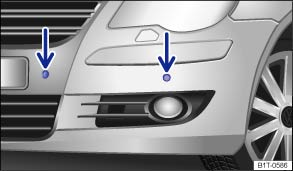
Fig. 143 Parking distance warning system sensors in the front bumper
 First read and observe the introductory information
and safety warnings
First read and observe the introductory information
and safety warnings There are four sensors in the bumper.
Switching the parking distance warning system at the rear on and off
- Switching on: select the reverse gear while the ignition is switched on.
- Switching off: deselect the reverse gear.
Switching the parking distance warning system on and off for the front and back
- With the ignition switched on press the button
 .
.
- Switch on automatically: select reverse gear.
- Switch off automatically: drive faster than approximately 15 km/h (9 mph).
The indicator lamp in the button lights up when the function is switched on.
Special features of the parking distance warning system
- The parking distance warning system cannot be switched on if the factory-fitted towing bracket is electrically connected to the trailer.
- In certain circumstances, the parking distance warning system registers water on the sensors as an obstacle.
- The signal will become quieter after a few seconds if the distance remains the same. The volume will remain constant if the audible warning is permanent.
- As soon as the vehicle moves away from the obstacle again, the signal is switched off automatically. The signals will be switched on again automatically if the vehicle nears an obstacle again.
- There will be no audible warning signal if the selector lever is in the P position.
- A Volkswagen dealership can adjust the volume of the warning signals.

A fault in the parking distance warning system will be indicated via a tone when activated for the first time and by the indicator lamp flashing in the button. Switch the parking distance warning system off by pressing the button and have it checked as soon as possible by a qualified workshop.
Volkswagen recommends that you practise using the parking distance warning system in a traffic calmed area or car park. In this way you can become familiar with the system and the functions in a safer environment.
 Introduction
This chapter contains information on the following subjects:
→ Parking distance warning system
→ Optical parking system (OPS)
→ Optical parking system (OPS) with al ...
 Optical parking system (OPS)
Fig. 144 OPS screen: Ⓐ obstacle detected
in the monitored area behind the vehicle Ⓑ monitored area in front of the vehicle
Fig. 145 OPS screen: Ⓐ obstacle detected
in segment Ⓑ monitore ...
Other materials:
Volkswagen Touran Owners Manual. Folding backrests in the second row of seats forwards and backwards
Fig. 89 Second row of seats:
loops ① and ②
First read and observe the introductory information
and safety warnings The second row of seats is separated
into three single seats. Each part can be folded down to increase the size of the
luggage compartment.
Folding the bac ...
Volkswagen Touran Owners Manual. Stowage compartments in the variable luggage compartment floor
Fig. 118 Variable luggage
compartment floor: stowage area at the front ① and rear ②
Fig. 119 Variable luggage
compartment floor: securing with the support rod
First read and observe the introductory information
and safety warnings
Function
Ac ...
