
Volkswagen Touran Owners Manual: Function
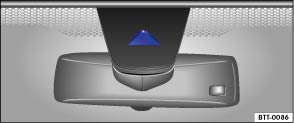
Fig. 155 Windscreen: Lane Assist camera window
 First read and observe the introductory information
and safety warnings
First read and observe the introductory information
and safety warnings Using a camera in the windscreen, the lane departure warning system detects possible marking lines on the road lane. If your vehicle approaches a recognised marking line unintentionally, the system will warn the driver with a corrected steering intervention. The corrective steering intervention can be overridden by the driver at any time.
No warning will be given if the turn signal is switched on as the lane departure warning system will presume the lane change is deliberate.
Steering wheel vibration
The following situations will cause the steering wheel to vibrate and demand active steering intervention by the driver:
- If the maximum steering moment in corrective steering intervention is not sufficient to keep the vehicle in the lane.
- If a lane is no longer detected by the system during the corrective steering intervention.
Switching the lane departure warning system on and off manually
- Using the button for driver assist systems, select the corresponding menu option .
- OR: in the menu Settings sub-menu Assistant, activate or deactivate the system using Lane Assist . A tick indicates when a driver assist system is switched on.
Automatic switch-off: The lane departure warning system can switch itself off automatically if there is a system malfunction. The indicator lamp goes out.
Lane departure warning system is not active (the indicator light lights up yellow)
- If the vehicle speed is less than approx. 65 km/h (40 mph).
- If the lane departure warning system cannot detect the markings on the lane the vehicle is in. For example due to road works or in snow, dirt, wet weather or oncoming lights.
- The radius of a bend is too small.
- If there is no lane marking.
- If the nearest lane marking is too far away.
- If more than two lane markings are used per lane.
- If the TCS is switched off.
- If the system does not detect any clear steering activity by the driver over an extended period.
- Temporarily if the driving style is very dynamic.
- If the turn signal is switched on.

Before starting a journey, check that the camera window is not covered .
The camera window must be kept clean at all times.
 Indicator lamps
First read and observe the introductory information
and safety warnings
Lights up or flashes
Possible cause
Correction
Lane departu ...
 Switch of the lane departure warning system in the following situations
First read and observe the introductory information
and safety warnings The lane departure warning system should be switched
off due to system limitations in the following situations:
When ...
Other materials:
Volkswagen Touran Owners Manual. Description of the central locking system
First read and observe the introductory information
and safety warnings The central locking system enables
you to lock and unlock all the doors, the tailgate and tank flap from one central
point:
From outside the vehicle with the vehicle key.
From inside the vehicle with the c ...
Volkswagen Touran Owners Manual. Checking and refilling the windscreen washer fluid level
Fig. 85 In the engine compartment:
cap of washer fluid reservoir
First read and observe the introductory information
and safety warnings The windscreen washer fluid level
should be checked regularly and topped up as necessary.
Open the bonnet .
The washer fluid rese ...
